
What is CDN? Boost Your Website Performance and Security Today
What is CDN? Boost Your Website Performance and Security Today
Get ahead in the competitive digital landscape with Content Delivery Networks.
Introduction
In today's fast-paced digital world, website performance and security are critical for success. Whether you're a website owner or a developer, you need to be well-versed in the latest technologies and trends to stay ahead of the competition. One such technology is the Content Delivery Network (CDN). In this comprehensive guide, we'll explore what a CDN is, how it works, its benefits, and how to choose the right one for your website. So let's dive in!
What is CDN?
CDN (Content Delivery Network) is a content delivery system based on network technology. Its main function is to store a website's static resources, such as images and videos, on caching servers deployed around the world in locations closest to the user, in order to accelerate access.
The basic principle of CDN is to deploy caching servers in areas or networks with relatively concentrated user traffic, and use global load balancing technology to direct user requests to the nearest functioning caching server, which directly responds to the user's request. This can bypass potential bottlenecks and links on the Internet that may affect data transmission speed and stability, making content transmission faster and more stable.
The CDN system is composed of nodes servers placed throughout the network, and builds an intelligent virtual network on top of the existing Internet infrastructure. The CDN system can dynamically redirect user requests to the nearest service node based on real-time information such as network traffic, the connection and load status of each node, and the distance and response time to the user. This allows users to obtain the required content nearby, solving the problem of congested Internet networks and improving the response speed of accessing websites.
The main function of CDN is to accelerate website access speed, reduce user waiting time, and improve user access experience. At the same time, CDN can effectively reduce website bandwidth costs, alleviate the load pressure on the origin server, and enhance website security and reliability.
In a word, CDN is a distributed caching server that stores a large number of files distributed around the world, and can be accessed nearby by anyone. Through CDN technology, website access speed and user access experience can be effectively improved, making it an indispensable part of modern websites.
The working process of CDN
Network access process without CDN

Through the above diagram, we can understand that the process of accessing a website using CDN caching is as follows:
- The user enters the domain name to be accessed, and the operating system queries the IP address of the domain name from the local DNS.
- If the local DNS cache has expired, it queries the domain name's authoritative server from the ROOT DNS.
- The ROOT DNS replies with the domain name's authoritative DNS record to the local DNS.
- After obtaining the domain name's authoritative DNS record, the local DNS continues to query the IP address from the domain name's authoritative DNS.
- The domain name's authoritative DNS queries the domain name's record (usually CNAME) and replies to the local DNS.
- The local DNS obtains the domain name's record and queries the IP address from the intelligent scheduling DNS.
- The intelligent scheduling DNS replies with the most suitable CDN node IP address based on certain algorithms and policies, such as static topology and capacity, to the local DNS.
- The local DNS replies with the obtained domain name IP address to the user.
- After obtaining the domain name IP address, the user accesses the caching server.
- The CDN node server responds to the request and returns the content to the client, completing the data service process.
Through the above analysis, we can conclude that in order to achieve transparent access for ordinary users (where the user's client does not need to perform any settings after using caching), it is necessary to use DNS (domain name resolution) to guide users to access the cache server to achieve transparent acceleration services. Since the first step for a user to access a website is domain name resolution, modifying the DNS to guide user access is the simplest and most effective way.
Network access process with CDN
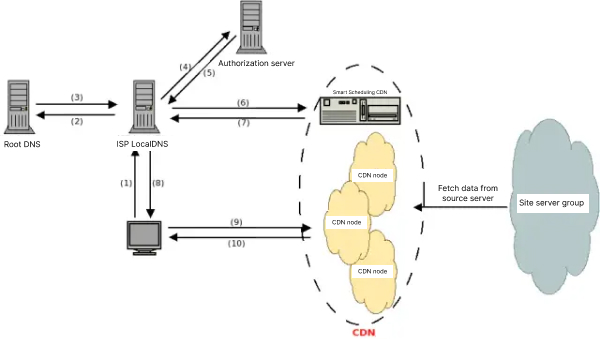
Through the above diagram, we can understand that the process of accessing a website using CDN caching is as follows:
- The user enters the domain name to be accessed, and the operating system queries the IP address of the domain name from the local DNS.
- If the local DNS cache has expired, it queries the domain name's authoritative server from the ROOT DNS.
- The ROOT DNS replies with the domain name's authoritative DNS record to the local DNS.
- After obtaining the domain name's authoritative DNS record, the local DNS continues to query the IP address from the domain name's authoritative DNS.
- The domain name's authoritative DNS queries the domain name's record (usually CNAME) and replies to the local DNS.
- The local DNS obtains the domain name's record and queries the IP address from the intelligent scheduling DNS.
- The intelligent scheduling DNS replies with the most suitable CDN node IP address based on certain algorithms and policies, such as static topology and capacity, to the local DNS.
- The local DNS replies with the obtained domain name IP address to the user.
- After obtaining the domain name IP address, the user accesses the caching server.
- The CDN node server responds to the request and returns the content to the client, completing the data service process.
Through the above analysis, we can conclude that in order to achieve transparent access for ordinary users (where the user's client does not need to perform any settings after using caching), it is necessary to use DNS (domain name resolution) to guide users to access the cache server to achieve transparent acceleration services. Since the first step for a user to access a website is domain name resolution, modifying the DNS to guide user access is the simplest and most effective way.
Composition of CDN
Content Delivery Network (CDN) is composed of multiple nodes, generally divided into central nodes and edge nodes.

Central nodes
The central nodes include the CDN network management center and the global load balancing DNS redirection resolution system, which are mainly responsible for the distribution and management of the entire CDN network.
Edge nodes
CDN edge nodes mainly refer to remote distribution nodes, which are composed of load balancing devices and high-speed caching servers.
The load balancing device is responsible for balancing the load of each Cache in each node to ensure the work efficiency of the node. At the same time, it is also responsible for collecting information from the node and the surrounding environment, maintaining communication with the global load balancing DNS, and achieving the load balancing of the entire system.
The high-speed caching server (Cache) is responsible for storing a large amount of information from client websites and responding to local user access requests like a website server close to the user.
Through the control of the global load balancing DNS, the user's request is transparently directed to the nearest node, and the Cache server in the node responds to the terminal user's request like the original server of the website.
Because the edge nodes are closer to users, their response time is faster.
The central node is like the main warehouse responsible for cargo allocation in a warehousing and distribution network, while the edge node is like the local warehouse in each city responsible for storing cargo.
cdn-related technologies
CDN technology is a technology for building a large warehousing and distribution network, which needs to consider issues such as caching algorithms, distribution capabilities, load balancing, DNS-based intelligent scheduling, supported protocols, content publishing, content storage, content routing, and content management.
Caching algorithms
Caching algorithms use caching proxy software Squid to determine hit rates, source server pressure, and FTP node storage capacity;
Distribution capabilities
Distribution capabilities depend on IDC capabilities and IDC strategic distribution;
Load balancing
Load balancing uses load balancing software Nginx to determine the best routing, response time, availability, and service quality;
DNS-based
DNS-based load balancing uses DNS server software BIND to implement domain name redirection and intelligent scheduling of optimal node services;
Cache points include client browser cache and local DNS server cache;
Cache content includes DNS address cache, client request content cache, and dynamic content cache.
Supported protocols
Supported protocols include static acceleration, dynamic acceleration (including image acceleration and certificate-based HTTPS acceleration), download acceleration, streaming media acceleration, enterprise application acceleration, and mobile application acceleration.
Content publishing
Content publishing uses technologies such as indexing, caching, stream splitting, and multicast to publish or deliver content to remote service points (POPs) closest to users.
Content storage
Content storage needs to consider two aspects of issues, one is the storage of content sources, and the other is the storage of content in cache nodes.
Content routing
Content routing uses an overall network load balancing technology to balance user requests on multiple remote POPs through the redirect (DNS) mechanism in the content router to ensure that users' requests receive the response of the nearest content source. Content management uses internal and external monitoring systems to obtain status information of network components, measure the end-to-end performance of content publishing (such as packet loss, delay, average bandwidth, startup time, frame rate, etc.), and ensure that the network is in the best operating state.
Related terms
CNAME record
A CNAME record is a type of domain name resolution record, also known as an alias record. It can resolve one domain name to another domain name. When the DNS system queries the name to the left of the CNAME, it will be redirected to the name to the right of the CNAME for further query until the last PTR or A name is reached, and a response will be made only if the query is successful, otherwise it fails.
For example, if you have a server that stores a lot of data, and you use "docs.example.com" to access these resources, but also want to access them through "documents.example.com", you can add a CNAME record in your DNS resolution service provider to point "documents.example.com" to "docs.example.com". After adding this CNAME record, all requests to "documents.example.com" will be redirected to "docs.example.com" and receive the same content.
CNAME domain name
CNAME domain name is a domain name assigned by the CDN provider console when you access the CDN. You need to add a CNAME record in your DNS resolution service provider to point your acceleration domain to this CNAME domain name so that all requests for this domain name will be redirected to the CDN node, achieving the acceleration effect.
DNS
DNS (Domain Name System) is a domain name resolution service that resolves domain names into network-recognizable IP addresses. People are accustomed to remembering domain names, but machines only recognize IP addresses. The conversion between domain names and IP addresses is one-to-one, and the entire process is automatically completed by a dedicated domain name resolution server. Common DNS resolution service providers include Alibaba Cloud DNS, DNSPod, Xinnet DNS, Route53 (AWS), Dyn, Cloudflare, etc.
Origin host
Origin host refers to a specific site on the origin server that is accessed by a back-to-source request. For example, if the origin server is the domain name origin server "www.a.com" and the back-to-source host is "www.b.com", the actual back-to-source is a request to the IP address resolved by "www.a.com", corresponding to the site on the host named "www.b.com".
Protocol back-to-source
Protocol back-to-source refers to using the same protocol as the one used by the client to access resources when returning to the source. That is, if the client uses HTTPS to request resources, when the CDN node does not cache the resource, the node will use the same HTTPS protocol to return to the source to obtain the resource. Similarly, if the client uses an HTTP protocol request, the CDN node will also use the HTTP protocol when returning to the source.